
How to Use the Phonak Roger Table Microphone Remote Control

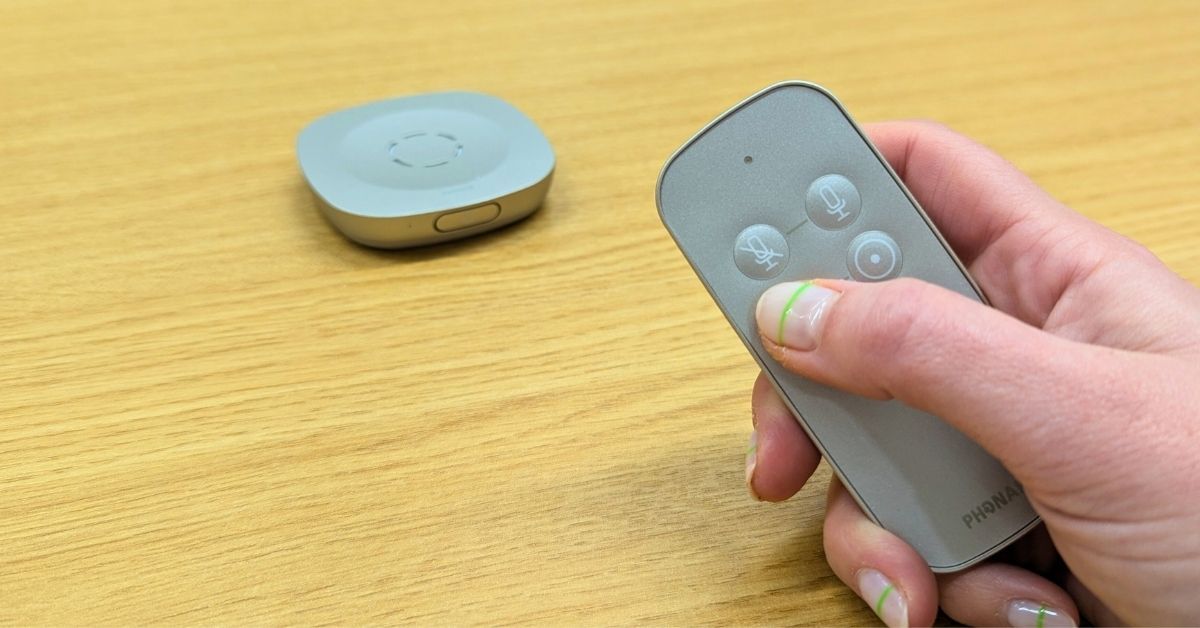
The Phonak Roger Table Microphone is designed to make group discussions easier by improving speech clarity in any environment where multiple people might be speaking around a table or room.
The Table Mic comes equipped with a remote control, giving you simple, effective ways to manage sound pick-up and reduce unwanted background noise.
In this video, our Managing Director, David Evans, explains how the remote works, what each button does, and how to adjust the settings for different environments.
What Can You Do With the Phonak Roger Table Mic Remote?
The remote control allows you to:
- Mute and unmute the microphone quickly
- Adjust the sound pick-up range for different group or room sizes
- Optimise listening comfort depending on the setting
These controls are particularly useful in offices, classrooms, and conference rooms where background noise or distance can affect speech clarity.
Understanding the Phonak Roger Table Mic's Pick-Up Range Settings
Expand the options below to understand more about the two available pick-up range options.
Large Pick-Up Range
- Ideal for large group meetings
- Perfect when the mic is positioned in the middle of a table
- Capture speech from multiple speakers
- Default setting for more situations
Small Pick-Up Range
- Best option for smaller meetings or focused listening
- Reduces distant background sounds
- Useful when being placed in the corner of a larger room
Switching to the right range helps speech sound clearer and more comfortable.
Tips for Getting the Best Out of Your Phonak Roger Table Microphone
- Use the large pick-up range for round-table meetings
- Switch to the small pick-up range in noisy or open-plan spaces
- Place the microphone on a stable surface
- Remember: the pick-up range resets after switching the devcice off
Want more help?
For more practical demos and how-to videos, visit our YouTube Channel. Our video guides make it easy to get the most from your Roger Table Mic and other hearing aid accessories.